How I Built Chat Branching & Forking
Build the Entire System from Scratch Using SQL and Tree Structures

Why do we need branching?
It's a fair question to ask - so let's see what happens with a simple chat (conversation). We send our message and get a response, that's it — it just goes on and on like a simple growing list, and it's simple to store and retrieve from our database too. (Doesn't matter if you're building a normal chat messenger or an AI chatbot, it works the same way in both cases.)
Let's say you're building the most basic chat storage you can think of. One table, one row per message, ordered by time.
model Message {
  id             String   @id @default(cuid())
  conversationId String
  role           String   // "user" | "assistant"
  content        String   // actual msg
  createdAt      DateTime @default(now())
}
You have this conversation:
| id | role | content |
|---|---|---|
| 1 | user | What is SQL? |
| 2 | ai | SQL is a language for querying relational databases... |
| 3 | user | What is an ORM? |
| 4 | ai | An ORM lets you work with a database using your language's objects instead of raw SQL. |
| 5 | user | What are the famous ORMs? |
| 6 | ai | Two popular ones: Prisma and Drizzle. |
Loading it is one line:
SELECT * FROM Message WHERE conversationId = 'x' ORDER BY createdAt ASC;
That's it - that's how a normal chatbot works at the DB layer.
Now let's make our life a little easier - what if I want to edit one of my previous messages with a small change, but also want to preserve the previous version? We can't do that in this normal setup. (If you just delete it and replace it, you've lost it forever - but you might want to go back to it later.) And the second use case: over time our conversation grows, and we want to split it into two parts while preserving all the context up to that message - or we've got two different directions to explore in the same chat, but we have to set one aside to explore the other.
Why branching? Can't we just do it all in a single conversation? Simple answer - no, you can't, because as your chat keeps growing you'll eventually hit your context window, and the model starts hallucinating. You'll also have a lot more messages to load from the DB every time, which increases your database and server load too.
If you've never used conversation branching before, it's much easier to understand by seeing it in action.
🎬 Quick demo: Switch between branches, create a new conversation branch, inherit previous context, and continue chatting normally.
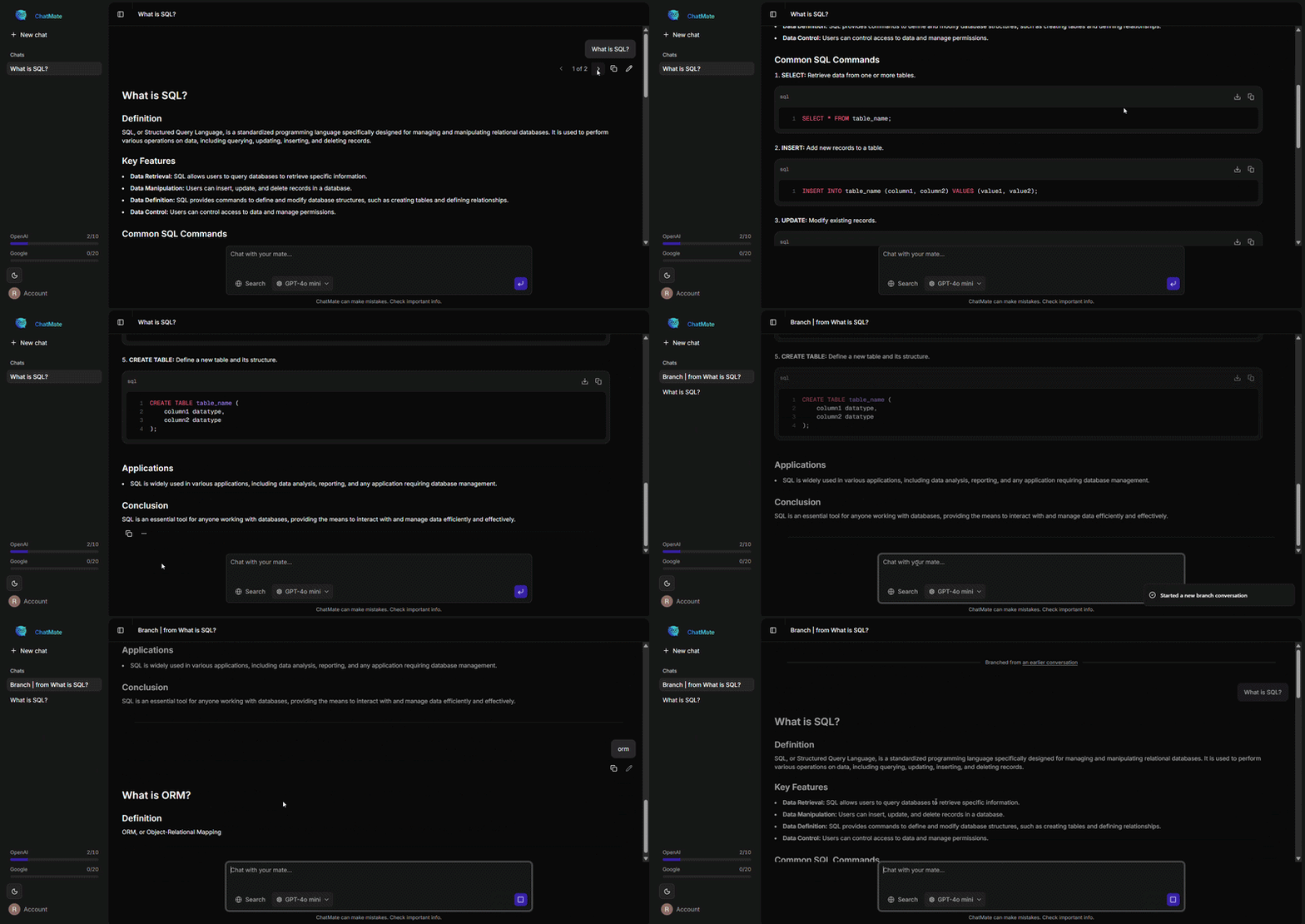
If you'd like to try it yourself or explore the implementation, check out ChatMate:
Otherwise, let's dive into how it all works under the hood.
What is branching?
Here's the whole idea in one sentence: a conversation isn't a list, it's a plant / tree.
A plant doesn't grow in a straight line forever. A stem splits - one becomes two, both keep growing, and neither one is "the real stem." That's branching. Nothing more mystical than that. We just have to modify our model/schema a bit - that's it.

You can see there are two branches from a single message - one is the inactive one (greyed out), and the other is the active one. You can switch between them whenever you want.
And once a conversation can branch, there's a second, related idea that falls almost naturally out of it: forking - instead of branching within the same conversation, you can pull out a completely new conversation from your existing one without losing any context.

That's genuinely the entire concept. Everything from here is just: how do you actually store a tree in a SQL table? And you'll see a tree isn't that tough, though - just bear with me for a while.
Okay, now let's build it
Step 1: give every message a parent
One column is the entire foundation:
model Message {
  id             String  @id @default(cuid())
  conversationId String
  role           String  // "user" | "assistant"
  content        String

  parentId       String? // the message this one replied to
}
parentId doesn't care whether the message before it came from the user or the AI - it just points at whatever came right before, and in a real conversation that naturally alternates: user → ai → user → ai. Nothing special about it.
Any number of messages can share the same parentId. That's it - that's what makes them siblings, which is the same thing as saying "branches at the same point."
Step 2: know which branch is actually showing
Storing the tree isn't enough by itself. If message 1 has two children (the old reply and a newer one), the app needs to know which one to actually display when you open the conversation. So we add one more pointer, going the other direction:
// Message

model Message {
  id            String  @id @default(cuid())
  parentId      String?

  activeChildId String? @unique  // which reply is showing/active right now
}

// Conversation

model Conversation {
  id           String   @id @default(cuid())

  activeRootId String?  @unique  // same idea, but for the very first message

  forkedFromConversationId String? // set only if this whole conversation was forked off another one (will help with delete)

  forkedFromMessageId      String? // ...and this is exactly which message it forked from
}
activeChildId is the message that's currently open/active - it doesn't say anything about which one is the "best" or "newly created," just a pointer to it. When you switch branches, it simply updates that pointer.
activeRootId is the same idea one level up, because even the very first message can have siblings (a user can edit the conversation's first message too) - that's exactly what happens when you edit your opening question.
One important detail: activeChildId does not automatically mean "the newest child." It's a real decision, stored deliberately. If it just meant "whatever was created last," then switching back to an older branch and refreshing the page would silently snap you back to the newest one - which isn't what you asked for. So every time you create a branch or switch to one, this pointer gets updated on purpose, not inferred.
Step 3: reading a conversation
Now that the pointers exist, showing a conversation on screen is genuinely simple: start at the conversation's activeRootId, and just keep following activeChildId until you run out.

const path = []; // initialize the empty array

let currentId = conversation.activeRootId; // start with the very first active msg id

while (currentId) {
  const message = allMessages.get(currentId);
  if (!message) break;
  path.push(message);
  currentId = message.activeChildId; // keep following the active child
}
That's the entire "load a conversation" algorithm. No recursion, no complicated tree traversal - just "follow the pointer, follow the pointer, follow the pointer" until there isn't one left. While we're walking through, we also quietly note down each message's siblings (anyone else sharing that same parentId) - that's what lets the little ‹ 2/3 › navigation arrows show up in the UI without a second trip to the database.
Step 4: saving a message = pointing it at whatever came before it (parentId)
Saving works the same way in reverse. You're given a list of messages from oldest to newest, and for each new one, its parent is just "whatever message came right before it in that list":
let previousId = null;

for (const message of messages) {
  if (isNew(message)) {
    // if this message is new, create it and set its parent to the previous
    // message (or null if there isn't one)
    await createMessage({ ...message, parentId: previousId });

    if (previousId) {
      // this new message is now the active child
      await updateMessage(previousId, { activeChildId: message.id });
    }
  }
  previousId = message.id; // move on — this message becomes the new "previous"
}
Step 5: editing creates a sibling, not an overwrite
Back to the running example. You edit message 1:

The old "What is SQL?" is never touched. It's just not where activeChildId points anymore - which is exactly why you can click ‹1/2› and get it back.
Step 6: forking — the "brand new conversation" branching
Now the ORM part of our example: message 6 - "Two popular ones: Prisma and Drizzle." - is where you decide to go deep on Prisma, in its own conversation.
The tempting — but wrong way to build this is by copying all the previous messages into the new conversation and continuing to chat from there. Sure, that would work, but ask yourself: is that really the right way to do it? That's the whole reason we built this tree in the first place - so why not actually use it?
The actual way: let the new conversation's first message point its parentId at message 6 - the exact same mechanism from Step 1, just now reaching across into a different conversation.

export async function forkConversation(messageId: string) {
  // find that (input) message in the DB first
  const message = await prisma.message.findUnique({ where: { id: messageId }, /* ... */ });

  // create a new branched conversation
  return prisma.conversation.create({
    data: {
      title: `Branch | from ${message.conversation.title}`,
      forkedFromConversationId: message.conversationId,
      forkedFromMessageId: message.id,
    },
  });
}
Nothing stops a message's parentId from pointing at a message in a different conversation - that was never actually a rule enforced by the database, just something we happened to assume, simply because we didn't have this specific use case until now. Forking is just... not assuming that anymore.
Reading it back: when you open the forked conversation, the app needs to show you the history it inherited (it's a little tricky but not hard to understand). So it does the Step 3 walk (activeRoot → activeChild → ...), but backwards - starting at the message it was forked from, and following parentId upward instead of activeChildId downward, even when that walk crosses into a different conversation:
// starting from messageId (where it was forked from)
async function getInheritedHistory(messageId) {
  const chain = [];
  let cursor = messageId;
  while (cursor) {
    const message = await findMessage(cursor);
    if (!message) break;
    chain.push(message);
    cursor = message.parentId; // may belong to a different conversation entirely
  }
  return chain.reverse(); // because we read it backward
}
That history renders read-only, above the new conversation's own messages, for context - and it's re-fetched live every time, never copied or stored.
One catch that took me by surprise: deleting the original conversation would normally cascade-delete every message in it - and we can't afford that if there's a forked conversation hanging off it, because the forked conversation's previous messages/context were never copied over - they just point back at the original via parentId. So before deleting, we first check whether any forked conversation exists for this specific conversation — if yes, we don't delete it, we just hide it from the user's view. Once the last thing depending on it is itself deleted, it finally gets cleaned up for real.

Putting the whole example together
Here's every step from this post, in one diagram - the edited root, the linear middle, and the fork, all at once, colored so the inactive branch stands out:

A couple of things worth knowing if you build this yourself
Always assume a chain could loop back on itself, even though nothing should ever cause that on purpose. Any time you're following pointers in a
whileloop (Step 3, or the upward walk in Step 6), keep track of what you've already visited and stop if you see it again - cheap insurance against a rare bug turning into an infinite loop that crashes your backend.Handle deletes properly: make sure you write the delete condition securely - otherwise you risk deleting an original or forked conversation you shouldn't have, or leaving those messages behind in your DB anyway, which doesn't get you anything except more dead data (and cost) hanging around.
The one idea underneath all of it
Every piece of this comes down to the same trick, just applied at a bigger and bigger scope:
Don't copy what's active. Just point at it.
Within one message:
activeChildIdpoints at which reply is showing.Within one conversation:
activeRootIdpoints at which first message is showing.Across conversations:
forkedFromMessageIdpoints at where a whole new conversation grew from.
Same idea, just used at different scales. Once that clicks, the rest of this post is really just "here's where we wrote that idea down as a database column."
About the author
- AI Engineer and Full-Stack Developer building AI products and sharing what I learn along the way. I write about GenAI, LLMs, Networking, system design, and practical software development - turning complex ideas into simple, hands-on guides.
Comments
Join the discussionNo comments yet. Be the first to comment.


